Process Drill-Down
The Drill-Down tab provides granular insights into the performance of individual modules within your Experience.
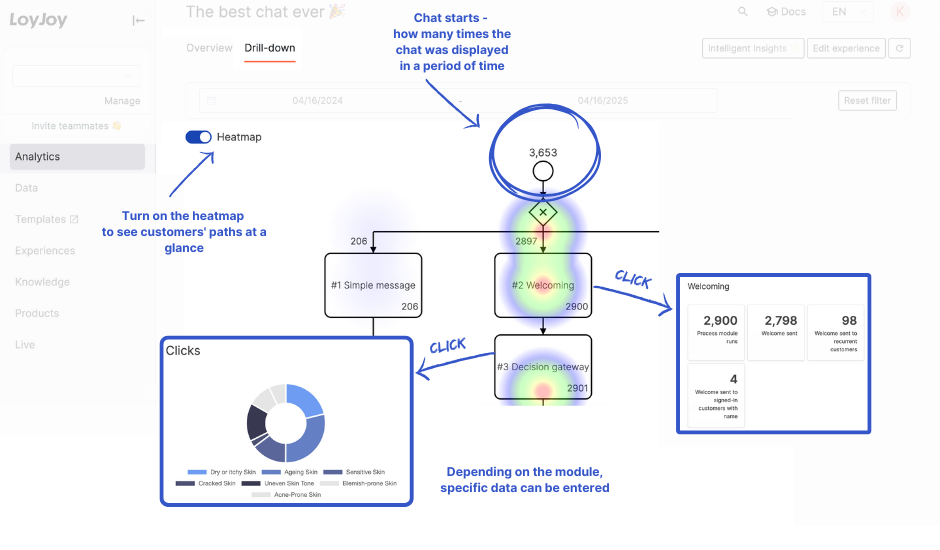
It overlays your process flow with a visual Heatmap to indicate traffic frequency. The color spectrum ranges from blue/green (low traffic) to yellow/red (high traffic), allowing you to instantly identify the most popular paths and potential drop-off points.
Filtering Data
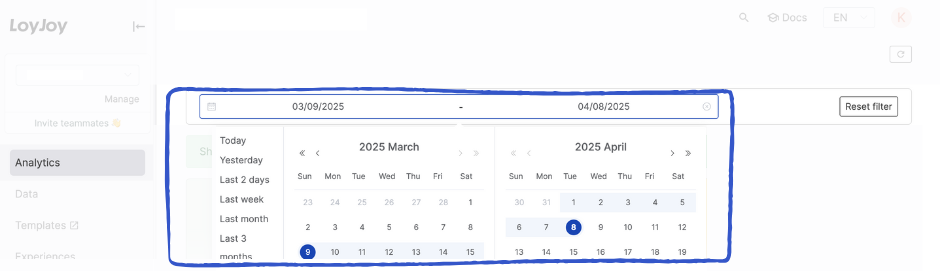
Consistent with other analytics views, you can refine the displayed data using the global date filter. Select a predefined period (e.g., "Last month") or define a custom start and end date.
Note: The selected timeframe applies to the heatmap and all detailed module statistics.
Module-Specific Metrics
By clicking on any module, event, or control flow element in the diagram, you open a detailed view for that specific step.
- Standard Metric: Every module displays its pass-through count (how often this step was executed).
- Specific Metrics: Depending on the module type, additional KPIs are available.
Metric Definitions by Module
| Module | Displayed Metrics |
|---|---|
| Appointment scheduler | Shows the total number of appointments booked. |
| Code entry | Tracks the total codes entered, split by valid (correct) and invalid (wrong) attempts. |
| Coupon code | Overview of uploaded codes, distributed codes, and redeemed/entered codes. |
| Decision Jump | Displays the distribution breakdown of which options users selected. |
| Giveaway participation | Counts total participations and the number of unique customers who participated. |
| Instant win | Shows total vs. unique participants, and the win/loss ratio. |
| Loyalty points | Tracks points awarded, unique customers receiving points, and rewards redeemed. |
| NPS Survey | Visualizes the distribution of detractors. Hovering over the chart reveals absolute numbers. |
| NPS Distribution | Displays the Net Promoter Score breakdown per score value (0-10). |
| NPS Answers | Allows you to download the qualitative text feedback (typed answers) from customers. |
| Return Jump | Counts the "Jump Out" and "Jump In" events separately. Note: This may result in a click count twice as high as the previous module. |
| Rewards | Shows total points redeemed and the distribution across different reward types. |
| Share link | Tracks sharing frequency via specific channels (Facebook, Email, Twitter, WhatsApp) or direct link copy. |
| Sign in | Overview of signed-in customers, PIN emails sent, and PIN entry success/failure rates. Also tracks New Customers (first-time email entry). |
| Opt-ins | For opt-in modules (Profiling, Reminder, SMS, Newsletter): Tracks Single Opt-ins, Double Opt-ins, Rejections, and Opt-outs. |
| Quiz | Shows correct vs. incorrect answers, image uploads, and the distribution of answers for specific questions. |
| Web push opt-in | Tracks how often the prompt was shown, Single/Double Opt-in rates, and rejections. |
| Personal Data | For data collection modules (Birthdate, Name, Phone, Address): Tracks the number of users who successfully entered their data. |
Data Export
You can export user data and saved variables collected within the modules to a CSV file. 👉 Learn how to export data here.